Make code review a graded skill

Students give feedback on each other's code. You grade how well they do it.

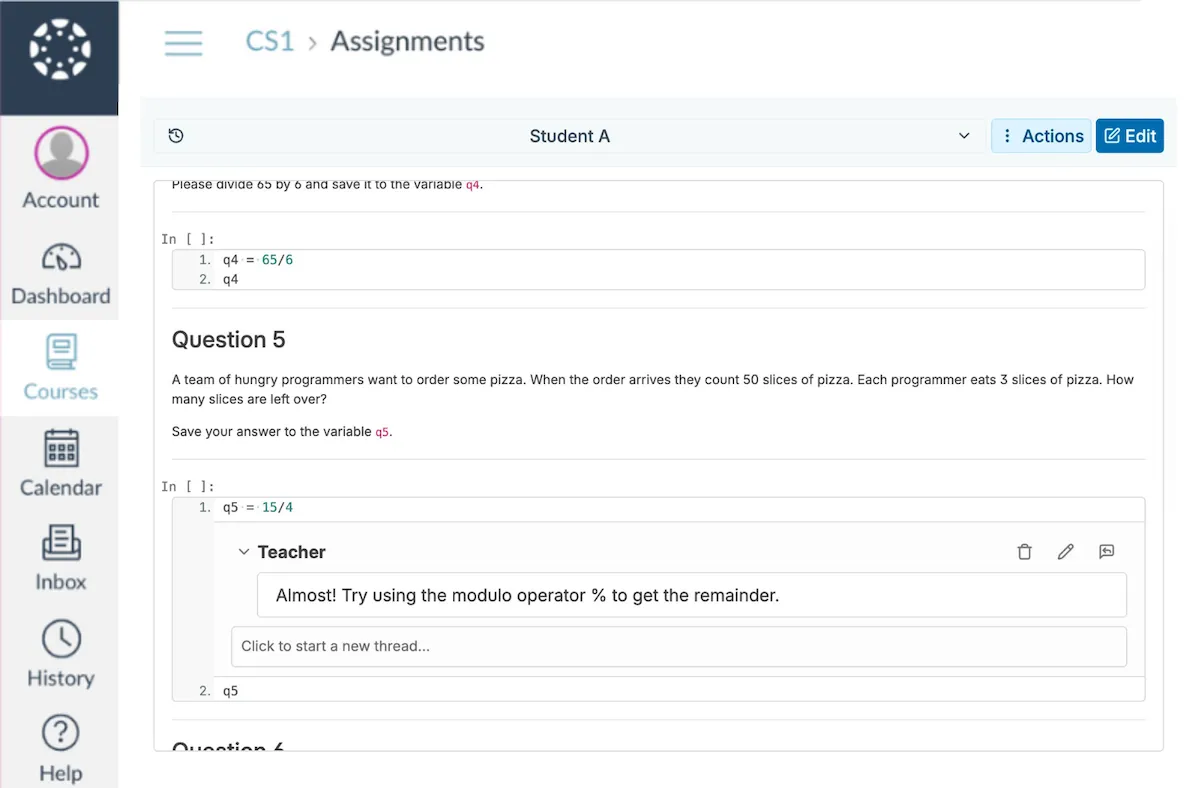
Instructor or peer providing targeted inline feedback on a Python script within CodeGrade's submission review.Teacher providing general and specific inline comments for student submission review in CodeGrade.

1. Students review real code, not summaries

Code review is a core skill in software development, but most CS programs never teach it. Peer feedback assignments put students in front of a classmate's actual code with the same inline commenting interface instructors use. They read the code, navigate the files, and leave feedback on specific lines.

  • Students review real code submissions with syntax highlighting and file navigation
  • Inline comments on specific lines, the same interface instructors use
  • Students learn to give structured code feedback, a skill they'll use in every dev team
Students providing peer feedback on code segments within CodeGrade's collaborative submission review.
CodeGrade AutoTest results displaying detailed scoring for functionality, style, and custom checks.

2. Grade the feedback, not just the code

Without accountability, peer feedback is "looks good to me." Attach a rubric to the peer feedback assignment and grade how thoughtful and specific each student's review actually is. Did they catch the edge case? Did they explain why the variable naming is confusing? The rubric makes feedback quality assessable.

  • Create a rubric that defines what good code feedback looks like
  • Grade each student's feedback using the rubric
  • Students learn that "looks fine" isn't a code review

3. Set it up once, let it run

Assigning 30 students to review each other's code by hand is a scheduling nightmare. Set how many reviewers each student gets and a deadline. Once the deadline passes, CodeGrade assigns reviewers automatically and students can start giving feedback.
  • Set the number of reviewers per student and a deadline
  • CodeGrade auto-assigns reviewers after the submission deadline
  • All feedback visible in one place alongside autograder results and your own comments

Give every student feedback that actually helps.

Inline comments, peer code feedback, and an AI assistant that works on your terms. All in one place.

Discover how institutions use CodeGrade to improve their coding courses

Dr. Volker Seeker

University Lecturer

“With CodeGrade, I was nominated for Best Course in the Student Awards at the University of Edinburgh!”

Jamie Andrews

Director of Graduate Programs

I can see the student submissions and slowly watch their scores creep up, which is incredibly rewarding!

Leslie Hendrix

Clinical Professor in Management Science

"Coding is like learning a sport. You have to practice repeatedly to improve."

Frequently Asked Questions

More features

Magnifying glass over a document, indicating inline code review in programming.
Leave feedback where it matters: on the code itself
Stop writing the same feedback on every submission. Comment on the code, save it as a snippet, reuse it all semester.
> Learn more
Checklist grid with checkmarks, representing grading rubrics for programming assignments.
Rubrics that connect to your autograder
Build rubrics with discrete or continuous categories. Auto-fill scores from autograder results. See rubric statistics across the class.
> Learn more
Checklist with a hand writing, symbolizing manual input in programming tasks.
When code needs a human eye, grade it fast
Split submissions across your team, navigate through them efficiently, and combine manual review with auto-grading.
> Learn more

Get started today and unlock the power of CodeGrade.